SecurityXploded.com


RemoteDirDetector
Tool to Detect Type of Directory Server Remotely
Download RemoteDirDetector
 
See Also
 
 
About RemoteDirDetector
This is the tool to find out the type of Directory servers running on remote machine. This is useful in environments where there are multiple directory servers such as Active Directory, eDirectory etc. Also it can be used in penetration testing while evaluating client environments where multiple Directory servers are deployed. Often times its not easy to find out the Directory Server type by physically logging into the system or by remotely authenticating via VNC or remote desktop, especially when you have to check large number of machines.

This tools make this complicated task simple. You can use it to scan a single machine or scan all systems on your lab network. As of now it supports following Directory servers.
  • Novell eDirectory
  • Microsoft Active Directory
  • Open LDAP Directory
  • Sun One Directory
  • Netscape Directory
  • IBM Lotus Domino
  • Oracle Directory
Since this tool is written in PERL script, you can execute from any system where PERL is installed.
 
 
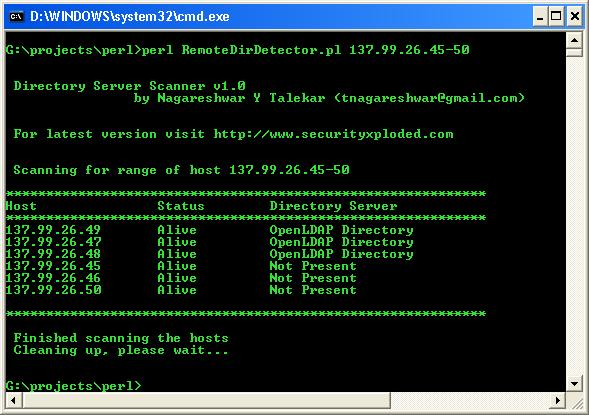
RemoteDirDetector in Action


Activities behind the Screen
Each Directory server has its own characteristics that clearly separate it from others. To find out its type, use any available LDAP search tool with the following parameters:
 
Filter: (objectClass=*)
Base:
Scope: base level
Attributes: vendorversion, objectClass, isGlobalCatalogReady

 
Now search for the above attributes and based on the results we can categorize the Directory servers into following types:
 
eDirectory
Attribute vendorVersion will contain the term "Novell eDirectory".
 
Sun One Directory
Attribute vendorVersion will contain the term "Sun Directory".
 
OpenLDAP
The objectClass attribute contains one of the values as "OpenLDAProotDSE".
 
Active Directory
Search result will contain the value "isGlobalCatalogReady".
 
 
So using just one LDAP search over the Directory, you can find out its type accurately.
 
 
Using this Tool
This tool uses LDAP perl modules and hence you need to download the same from http://ldap.perl.org before using it. Here is the general usage information.
 
Perl RemoteDirDetector.pl [-d] { host | host-range }

Options:
-d Do not use ping scan to check if the host is alive

//For single host
Perl RemoteDirDetector.pl -d ldap.myhost.edu
Perl RemoteDirDetector.pl 192.168.0.100
//For range of hosts
Perl RemoteDirDetector.pl 192.168.0.1-100
 
 
Download RemoteDirDetector
FREE Download RemoteDirDetector 1.3

License  : Freeware
Platform : Windows, Linux


See Also