SecurityXploded.com
Mailing List Join us on Google+ Twitter facebook facebook
OutlookPasswordDecryptor : The Outlook password recovery software | www.SecurityXploded.com
 
 
OutlookPasswordDecryptor


See Also


Contents
 
 
About
Outlook Password Decryptor is the FREE tool to instantly recover lost password for all versions of Outlook Application. Outlook stores the password for subsequent logins when user selects the 'Remember Password' option during authentication. The password is stored in the encrypted format and only respective user can decrypt the password.
 
Different versions of Outlook store the password at different locations using different mechanism. OutlookPasswordDecryptor can decrypt all these passwords within fraction of second. It can not only recover the passwords of the current Outlook version but also from any earlier Outlook versions used on the system.

Current version v2.0 supports report generation in XML format along with improved interface and reports.

It can recover passwords from all versions starting with Outlook Express to latest version, Outlook 2010 and works on wide range of platforms starting from Windows 2000 to Windows 7.
 
 
Features
OutlookPasswordDecryptor is the ONE application to recover passwords from ALL versions of Outlook. Also it can decrypt passwords from different type of Email account configurations supported by Outlook, such as
  • Exchange Server
  • IMAP
  • POP3
  • SMTP
  • LDAP
  • HTTP
On starting, it automatically detects the current Outlook version along with user & platform information. It also provides option to save the recovered password list to HTML or TEXT or XML file for future use.  
 
 
Internals
Different versions of Outlook uses different location and mechanism to store the account password along with other details such as email and server information.

Outlook Express, 98 and 2000 versions store the remembered password in the 'Windows Protected Storage' similar to older versions of Internet Explorer. The password link and other account information are stored at one of the below mentioned registry locations.
 
HKEY_CURRENT_USER\Software\Microsoft\Internet Account Manager\Accounts
HKEY_CURRENT_USER\Software\Microsoft\Office\Outlook\OMI Account Manager\Accounts
 
The newer version of Outlook starting from 2002 to 2010 stores the account password (other than Exchange Server) in encrypted format at following profile location
 
[Windows NT onwards]
HKEY_CURRENT_USER\Software\Microsoft\Windows NT\CurrentVersion\Windows Messaging Subsystem\Profiles

[Prior to Windows NT]
HKEY_CURRENT_USER\Software\Microsoft\Windows Messaging Subsystem\Profiles
 
Newer versions of Outlook store the 'Exchange Server' based passwords in the credential provider (like network passwords) which is more secure than other methods.

For more internal details on how OutlookPasswordDecryptor decrypts these passwords read the following research article, 'Exposing the Secret of Decrypting Outlook Passwords'
 
 
Installation & Uninstallation
Though OutlookPasswordDecryptor is a Portable tool, it comes with Installer so that you can install it locally on your system for regular usage. This installer has intuitive wizard (as shown in the screenshot below) which guides you through series of steps in completion of installation. At any point of time you can use Uninstaller to remove the software from the system.
 
OutlookPasswordDecryptor Installer
 
At any point of time, you can uninstall the product using the Uninstaller located at following location (by default)
 
[Windows 32 bit]
C:\Program Files\SecurityXploded\OutlookPasswordDecryptor

[Windows 64 bit]
C:\Program Files (x86)\SecurityXploded\OutlookPasswordDecryptor


Using OutlookPasswordDecryptor
OutlookPasswordDecryptor comes as portable application and it can also be installed locally on your system. It is very simple and straightforward to use.. You can just start it by double clicking on the executable file.

Here are the brief usage details....
  • On launch, it will display current Outlook version, logged in user name & OS version information.
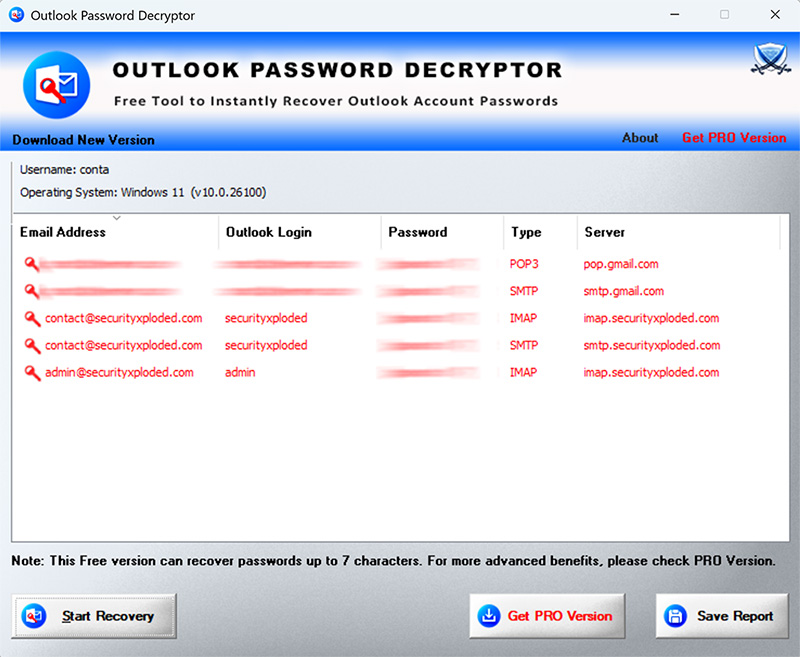
  • Now click on 'Start Recovery' button and it will instantly decrypt all types of stored passwords by Outlook. It will display clear text password along with other details such as Email address, User name, Account type and Server name.
  • Finally save the recovered password list to HTML or TEXT or XML file by clicking on 'Export' button and then select the type of file from the drop down box of 'Save File Dialog'..
 
Screenshots
Here are the screenshots which gives glance of OutlookPasswordDecryptor in action...
 
Screenshot 1: OutlookPasswordDecryptor showing the recovered passwords from different type email accounts stored by Outlook.
 
OutlookPasswordDecryptor
 
 
Screenshot 2: Outlook account password list exported in HTML format by OutlookPasswordDecryptor.
 
Export Outlook passwords to HTML
 
 
History
Version 2.0 :  13th Jan 2012
Support for report generation in XML format in addition to HTML/Text mode. Improved GUI interface and recovery reports.
 
Version 1.6 :  29th Mar 2011
Added new logo & links for passwordforensics.com in about section and few bug fixes.
 
Version 1.5 :  14th Nov 2010
New interface with cool banner & icon.  Integrated Installer for local Installation & Uninstallation of software. Auto software update version detector.
 
Version 1.0 :  3rd April 2010
First public release of OutlookPasswordDecryptor. Supports recovery of passwords from all version of Outlook starting from Outlook Express to Outlook 2010.
 
 
Disclaimer
OutlookPasswordDecryptor is the free tool and designed for good purpose to help users to recover the lost outlook account passwords. Like any other tool its use either good or bad, depends upon the user who uses it. However author is not responsible for any damage caused due to misuse of this tool.


Download
  FREE Download OutlookPasswordDecryptor 2.0

License  : Freeware
Platform : Windows XP, 2003, Vista, Win7

Win 7 Compatible
 
See Also