SecurityXploded.com
Follow us on Twitter
LDAPSearch : Simple LDAP Directory Search Tool - www.SecurityXploded.com
 
 
LDAPSearch
Download LDAPSearch
 
Four Star Award by Download.HR SoftPedia Clean Award Windows7Download.com 5 Star Award by Gear Download
 
 
See Also


About LDAPSearch
LDAPSearch is one of the simplest tool for remotely searching on the Directory servers such as eDirectory, Active Directory etc. Directory server provides the most scalable, high-performance LDAP data store for critical information within the industry and serves as the foundation for the new generation of e-business applications and Web services.

In this context, LDAPSearch makes it easy to remotely discover various information stored in these Directory servers. Also it can appear as very handy tool in troubleshooting any problems associated with LDAP Directory servers.

Newer version now works on Windows 7 operating system. Also it comes with enriched user friendly interface with cool look & feel.
 
 
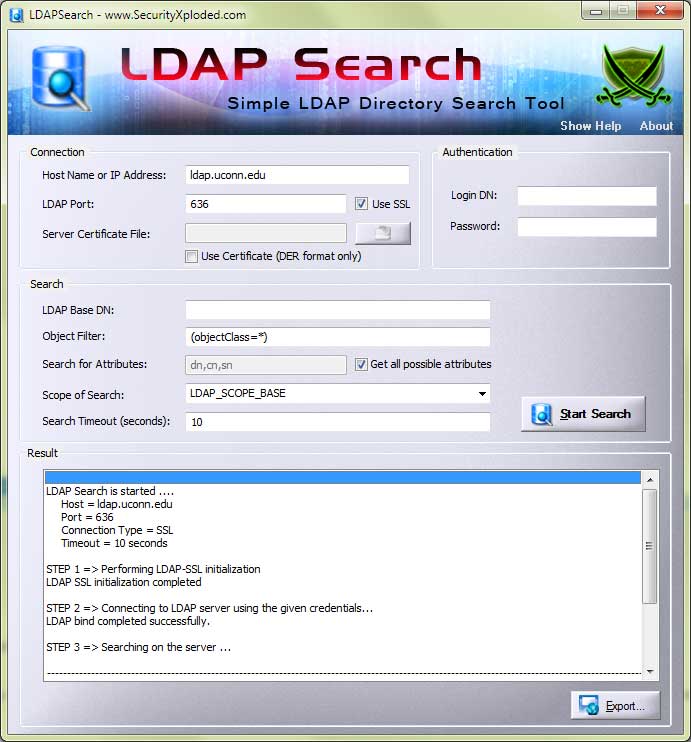
LDAPSearch in Action
LDAP Search GUI Application
 
 
Features of LDAPSearch
LDAPSearch is one of the easiest, fastest and lovely tool for searching Directory servers. It provides various options to tweak the search queries thus making the search operation more efficient.

Here are some of the salient features of LDAPSearch...
  • Supports both normal LDAP ( port 389) as well as LDAPSSL ( port 636 ) protocol. Also user can specify custom port in case the target server is running on non standard port.
  • Allows user to specify server certificate during SSL connection. This is useful when server requires client to use previously granted certificate for identification.
  • Authentication credentials can be provided with ease. In case of anonymous connection , default username and password is blank. However you can specify other usernames such as "anonymous" for the anonymous connection especially for Active Directory.
  • Following search options can be used to customize the query to get effective results.
    • Base DN: Indicates the sub object for search operation. Base DN must follow the LDAP naming convention in specifying the DN name. Keep it blank to search from root object.
    • Filter: Specifies the type of object to be searched.
    • Attributes: Custom attributes can be specified so as to cut down the search result. For retrieving all the attributes of the object select the "Get attributes dynamically" checkbox.
    • Scope: This specifies the depth of the level to search for under base dn. There are 3 levels. "BASE" means only the requested object specified in the base DN will be searched. "OneLevel" indicates that all the objects below the base DN will be searched. "Subtree" means all the objects under the base DN are searched recursively.
    • Timeout: This controls the time taken for LDAP search operation. While enumerating large number of results, this value needs to be modified accrodingly.
  • Search results can be directly written to the output file instead of displaying it in the window in case of large number of results.
  • Using the export option search results can be permanently stored to the disk file.
  •  
     
    History
     
    Version 3.0 : 25th Nov 2009
    Support for Windows 7, Enriched user interface, Renovated buttons, Better search progress indicator and bug fixes. 
     
    Version 2.2 : 10th June 2009
    Updated the banner with site update links, enhanced about dialog. Also fixed some of the bugs.
     
    Version 2.1 : 27th Jan 2008
    GUI is completely redesigned to make it look pleasant and more easy to use. Search operation is now performed in separate thread which prevents application from hanging when the search takes more time. Also the animation movie is displayed during search to indicate the status of operation. User can select the file for writing as well as exporting search results.
     
    Version 1.2 : 17th June 2007
    It is made Vista UAC compatible. Also the current search settings are stored in the registry which will be populated when application is run next time.
     
    Version 1.1 : 2nd Jan 2007
    LDAP search timeout option is introduced along with GUI modification. Also the results can now be directly written to the output file instead of list box.
     
    Version 1.0 : 25th May 2006
    First public release with the basic search features. 


    Download LDAPSearch
     
      FREE Download LDAPSearch 3.0

    License  : Freeware
    Platform : Windows XP, 2003, Vista, Windows 7

    Clean  Award by SoftPedia
     
     
    See Also


    Home - Tools - Articles - Research - Download - Statistics - Blog - PAD Files - About - Contact