SecurityXploded.com
Mailing List Join us on Google+ Twitter facebook Youtube RSS Feeds
DirectoryScanner : Remote Directory Server Fingerprinting Tool | www.SecurityXploded.com


DirectoryScanner
Download DirectoryScanner
 
 
5 Star Award 5 Star Award Five Star Award 5 Star Award
 
 
See Also


Contents
 
 
About DirectoryScanner
DirectoryScanner is the FREE Directory Server fingerprinting tool. It can help you to remotely detect the type of Directory servers (such as Microsoft Active Directory, Novell eDirectory etc) running on the local network as well as Internet.
Also it can be used in penetration testing while evaluating client environments where multiple Directory servers are deployed. Directory dedicated servers are typically used to store crucial data in an organization including employee authentication information. Often getting hold of poorly configured Directory server can be a gold mine for the pentester.

In addition to this, it can greatly help administrators to remotely keep tab on Directory Servers running in their network. At a time you can use it to scan  single or multiple systems in the network.

It can detect following popular Directory Servers
  • Novell eDirectory
  • Microsoft Active Directory
  • Open LDAP Directory
  • Sun One Directory
  • Netscape Directory
  • IBM Lotus Domino
  • Oracle Directory
It comes with Installer which helps in local installation & un-installation of the tool. It works on wide range of platforms starting from Windows XP to latest operating system Windows7.


Features of DirectoryScanner
Highlight of main features of DirectoryScanner
  • Remotely detect type of Directory Servers in the network.
  • Support for popular Directory servers including Active Directory, eDirectory, Open LDAP etc
  • Scan single or multiple systems on the network/Internet.
  • Ability to stop the scanning operation at any time.
  • Save the directory scan report to HTML file
  • Support for local Installation & Un-installation.
 
 
Installing DirectoryScanner
DirectoryScanner comes with Installer which helps in local installation & un-installation of the tool. It has intuitive setup wizard (as shown in the screenshot below) which guides you through series of steps in completion of installation. At any point of time you can use Uninstaller to remove the software from the system.
 
DirectoryScanner Installer


Using DirectoryScanner
DirectoryScanner is GUI application which comes with simple interface and makes it easy to use even for beginners.

Here are simple steps
  • Launch DirectoryScanner on your system after installation.
  • Select single or network to scan for single or multiple systems.
  • Enter the start & end IP address of host. Note that only 'class C' network range is supported.
  • Next click on 'Start Scan' button to being the directory scanning operation.
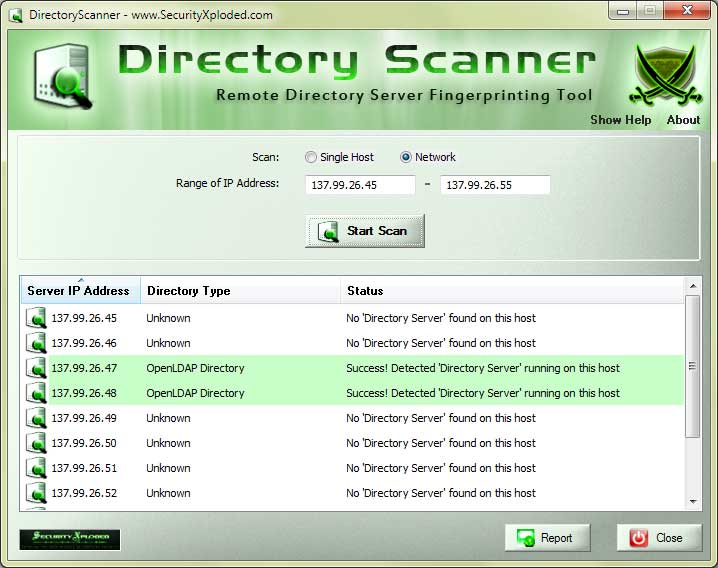
  • It will scan and display the status as well as results in the list box as shown in the screenshot below.
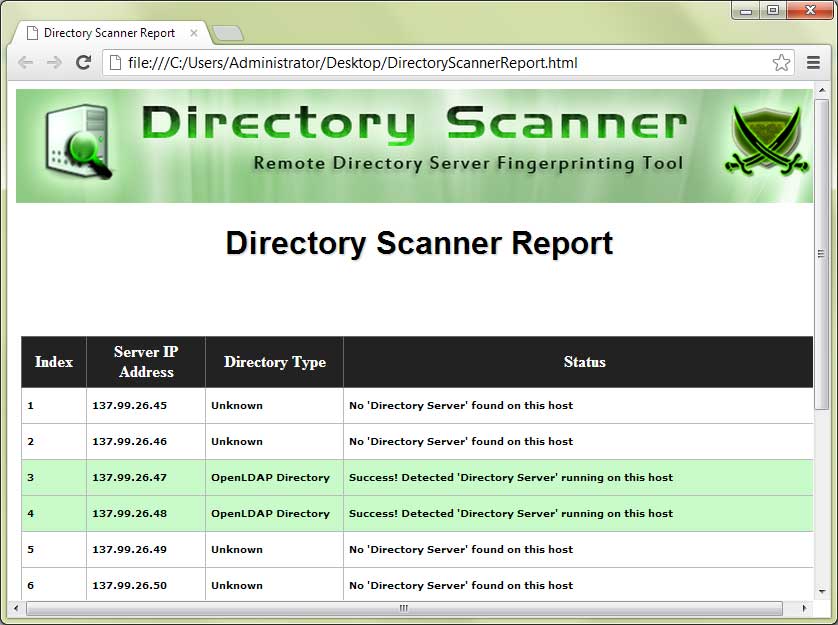
  • At the end, you can save scan report to HTML file by clicking on 'Export' button.
 
 
Screenshots of DirectoryScanner
Here are the screenshots of DirectoryScanner
 
Screenshot 1:  DirectoryScanner scanning and detecting few Open LDAP based directory servers on Internet.
 
DirectoryScanner
 
 
Screenshot 2:  HTML based Directory scan report generated by DirectoryScanner
 
directory scanner


Acknowledgements
This tool uses Novell - OpenLDAP SDK for the scanning operation.  My Special thanks to the SDK community for their constant support and ingenious work over the years.


Release History
Version 1.0 :  15th Apr 2011
First public release of DirectoryScanner


Download DirectoryScanner
 
  FREE Download DirectoryScanner 1.0

License  : Freeware
Platform : Windows XP, 2003, Vista, Win7

Win 7 Compatible


See Also