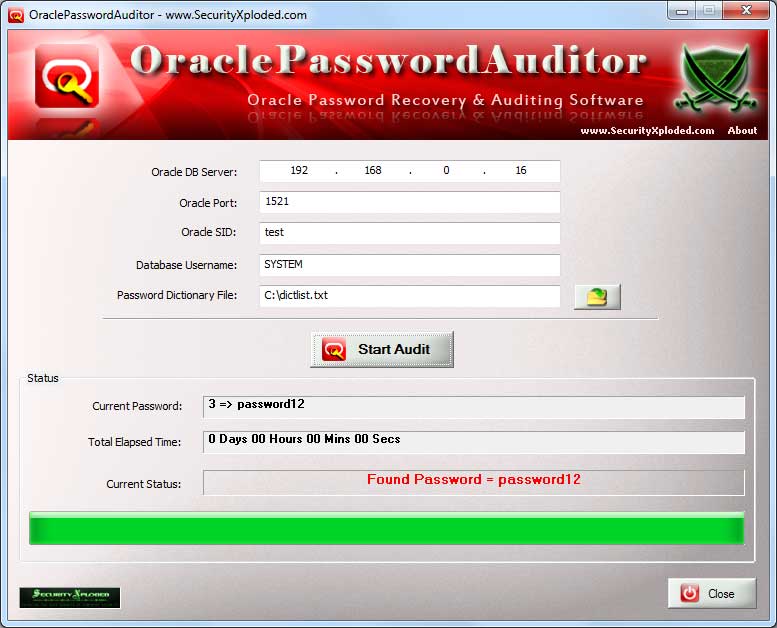
| |
| |
| |
| Oracle Password Auditor
Version: 3.0
|
|
|
|
|
| |
|
|
| |
| |
| |
|
|
|
| |
| |
|

|
Oracle Password Auditor is the FREE Oracle
database password recovery and auditing software.
|
|
|
|
It not only helps you to recover lost or forgotten Oracle
database password but also audit Oracle database setup in an corporate environment by discovering the
weak password configurations.
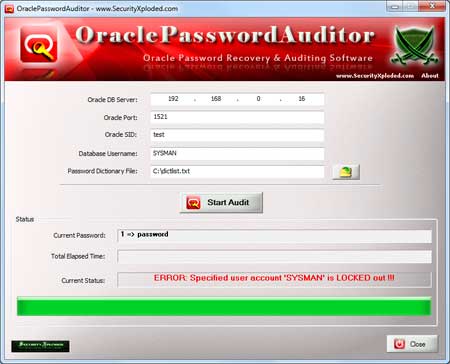
During auditing operation, it detects special cases such as Account Lockout, Incorrect Oracle SID, Session Limit problems etc. In such cases it stops the operation rather than blindly continuing with the
errors. Penetration testers can use this feature to detect any
account lockout issues and further verify if it is susceptible to
such DDOS attacks.
It uses simple & faster dictionary based password recovery method. Also in the beginning it can automatically check for well known default user/password combinations.
It is very easy to use with a cool GUI interface and a handy tool for IT administrators & Penetration Testers.
It
works on wide range of platforms starting from Windows XP to Windows 8.
|
| |
| |
| |
|
- Quickly Audit or Recover Your Lost Oracle
Password.
- Dictionary based Password Recovery method
- Automatically Checks for Default User/Password combinations
- Includes dictionary file having popular list of default
Oracle passwords
- Free and easy to use tool
- Very useful for IT administrators & Penetration
Testers
- Automatically detects Account Lockout,
Invalid SID, Session Limit problems.
- Displays detailed statistics during the operation.
- Integrated Installer for local Installation &
Uninstallation.
|
| |
| |
|
| OraclePasswordAuditor comes with
Installer which can help you in local installation & un-installation. It has intuitive setup wizard which
guides you through series of steps in completion of installation. |
| |
| At any point of time, you can uninstall the product using the
Uninstaller located at following location (by default) |
| |
[Windows 32 bit]
C:\Program Files\SecurityXploded\OraclePasswordAuditor
[Windows 64 bit]
C:\Program Files
(x86)\SecurityXploded\OraclePasswordAuditor |
| |
| |
| |
|
|
Oracle Password Auditor depends on Oracle Client binaries (oci.dll & oraociei11.dll) shipped with Oracle XE or Oracle Instant Client. Else you will get error like 'cannot start because oci.dll is missing..."
|
| |
| |
| |
|
|
|
|
Here are simple steps to use Oracle Password Auditor |
- Before you run, make sure you have 'Oracle DLLs' downloaded and copied to the same location as mentioned above.
- Now launch OraclePasswordAuditor on your system from installed
location.
- Enter your Oracle server IP address, port number,
sid and username for which to recover the password.
- Next select
or drag & drop the password list file (you can find one in
the installed location)
- Click on 'First Try Default...' if you want to try well known user/password combinations in the beginning.
- Finally click on 'Start
Audit' button to start the Oracle Password recovery
operation.
- You will see detailed statistics during password audit
operation
|
|
|
|
|
|
|
|
|
In some test cases we have observed it crashing when we start the auditing second time. If you see the same problem then just close the application and run it again to start fresh. |
| |
| |
| |
|
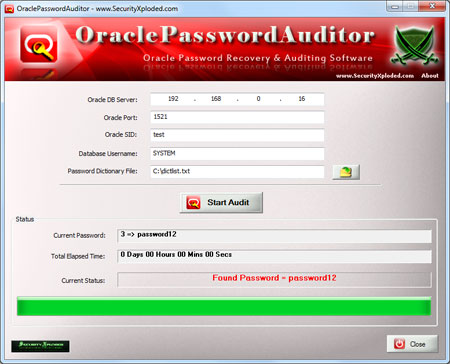
| Screenshot 1:Oracle Password Auditor is showing
the recovered Oracle Password |
| |
 |
| |
| Screenshot 2:Oracle Password Auditor is
detecting the locked out account and stopping the operation. |
| |
 |
| |
| |
| |
|
| Integrated Uninstaller into Windows Add/Remove Programs, now you can uninstall it in a standard way. Also added feature to dynamically download latest version. |
| |
| Auto copy the Oracle login password to clipboard on success. Improved UI interface with glowing icons and fixed few minor bugs. |
| |
| Mega edition with support for Windows 8. Includes new features like default passwords check in the beginning, optimized oracle password auditing technique and enhanced GUI interface. |
| |
| First public release of OraclePasswordAuditor |
| |
| |
|
| |
| |
|
|
|
| |
|
|
|
| |
|
|
| |
| |
| |
| |
| |
| |
| |
| |
| |
| |
| |
| |