| |
| |
| |
 |
|
|
|
| |
| |
|
|
| |
| |
|
|
| |
| |
| |
|
|
|
| |
| |
|
|
FlashfxpPasswordDecryptor is the FREE software to instantly
recover FTP login passwords stored by
FlashFXP -
most popular FREE FTP client application. FlashFXP stores the password for all the past
FTP sessions in the "sites.dat" file so
that user don't have to enter it every time. FlashfxpPasswordDecryptor
makes it easy to quickly scan & decrypt all these encrypted FTP login
passwords.
|
|
|
|
|
It presents both GUI as well as command line interface which
will be useful for penetration testers
& Forensic investigators. You can
either use it to automatically recover the stored passwords
from local system or recover passwords from remote machine by
manually feeding FlashFXP "sites.dat" file.
FlashfxpPasswordDecryptor works
on most of the Windows platforms starting from Windows XP to latest
operating system, Windows 7. |
| |
| |
| |
|
| Here are the highlights of top features of FlashfxpPasswordDecryptor |
- Instantly scan and recover all stored FTP login passwords from
FlashFXP.
- Comes with both GUI interface
&
Command-line
version.
- Useful for Penetration testers as well as Forensic
investigators.
- Recover Flashfxp passwords from local as well as remote system.
- Save the recovered password list to HTML file for transferring to other system or for
future use.
- Easier and faster to use with its enhanced user
friendly GUI interface.
- Support for local Installation and uninstallation of the
software.
|
| |
| |
| |
|
| FlashfxpPasswordDecryptor comes with
Installer so that you can install it locally on your system for regular
usage. It has intuitive setup wizard (as shown in the screenshot below) which
guides you through series of steps in completion of installation. At any
point of time you can use Uninstaller to remove the software from the
system. |
| |
 |
| |
| |
| |
|
FlashfxpPasswordDecryptor is easy to use with its simple GUI interface.
Here are the brief usage details
|
|
|
- Launch FlashfxpPasswordDecryptor after completion of
installation.
- Next click on 'Start
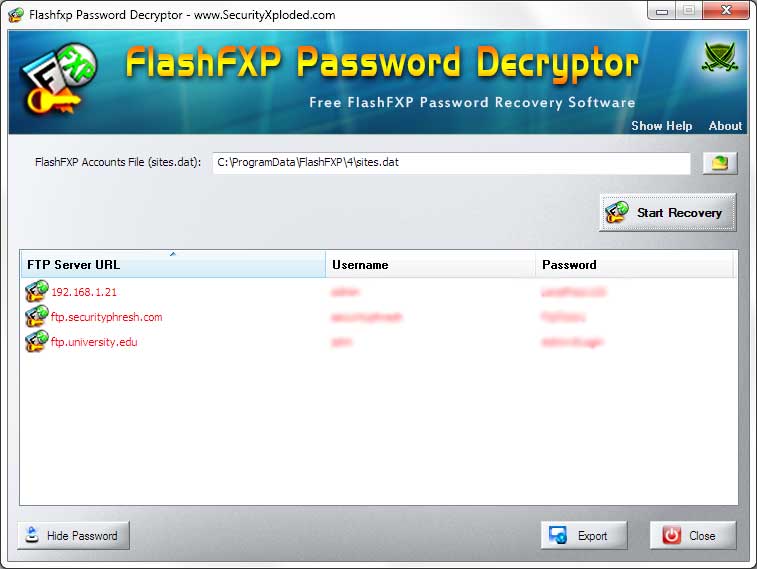
Recovery' button and all ftp login passwords stored by FlashFXP will be recovered & displayed as shown in screenshot 1
below.
- By default passwords are not shown for security
reasons as it is sensitive data. However you can click on'Show
Password' button at the bottom to view these passwords.
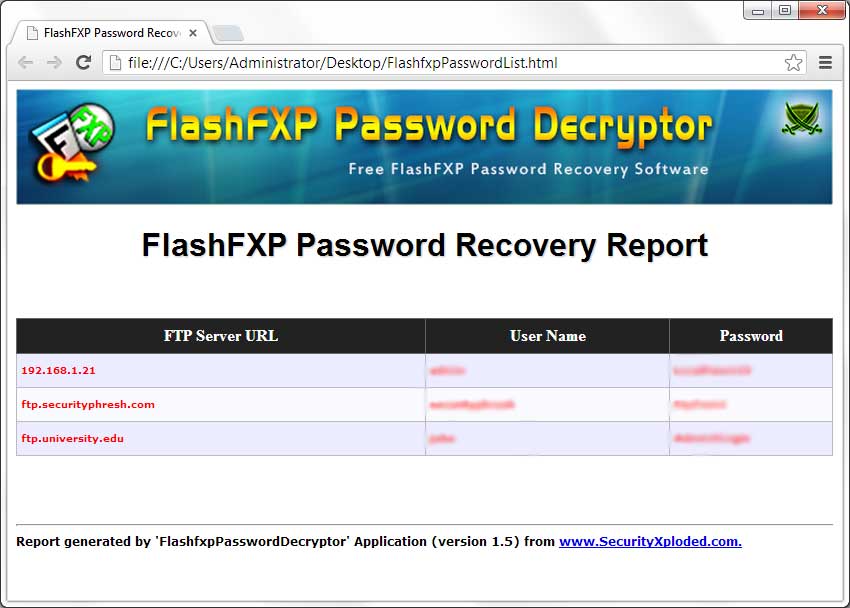
- Finally you can save all recovered password list to
HTML
file by clicking on 'Export to HTML' button.
|
|
You can also copy the "sites.dat" file from remote
machine and manually specify in the application to recover all the
stored FTP passwords. |
|
|
|
|
|
Here is the typical usage of command line version |
|
|
|
FlashfxpPasswordDecryptor.exe "<output_file path>" |
|
|
|
Here are some of the examples |
//Writes recovered
password to text file in current directory
FlashfxpPasswordDecryptor.exe pass.txt
//Writes recovered
password to HTML file in current directory
FlashfxpPasswordDecryptor.exe pass.html
//Writes recovered
password to TEXT file FlashfxpPasswordDecryptor.exe "c:\my
test\passlist.txt" |
|
It automatically detects the mode (text or html) by using the extension
of the specified file (txt or html). By default (or if no extension is
specified) it uses the TEXT mode. For more examples refer to Screenshot
2
below. |
|
|
|
|
|
|
|
| Here are the screenshots of
FlashfxpPasswordDecryptor |
| |
| Screenshot 1:FlashfxpPasswordDecryptor is showing the
recovered ftp login passwords. Passwords are not shown being sensitive data, you can turn
on by clicking on 'Show Password' button below. |
| |
 |
| |
| |
| Screenshot 2: Command line usage of FlashfxpPasswordDecryptor
showing various examples. |
| |
 |
| |
| |
| Screenshot 3: Exported list of of recovered
ftp login passwords by
FlashfxpPasswordDecryptor in HTML format. |
| |
 |
| |
| |
| |
|
| First public release of FlashfxpPasswordDecryptor |
| |
| |
|
| |
| |
|
FlashfxpPasswordDecryptor is not a hacking or cracking tool as it can recover only
your stored passwords. It cannot recover the passwords for other users
unless you have right credentials.
Like any tool its use either good or
bad, depends upon the user who uses it. However Author or
SecurityXploded is not
responsible for any damage caused due to misuse of this tool.
Read complete License & Disclaimer terms
here. |
| |
| |
| |
|
| |
|
|
| |
| |
| |
|
|
| |
| |
| |
| |
| |
| |
| |
| |
| |
| |
| |
| |
| |