|
| Asterisk Password Spy
Version: 12.0
|
|
|
|
|
|
|
|
| |
| |
|
|
| |
|

|
Asterisk Password Spy is the FREE tool to instantly reveal the
hidden
password behind asterisks (*****).
|
|
|
|
It's user friendly interface can help you to easily
find the passwords from any Windows based application.You can simply
drag the 'search icon' to any password box to find the
real password hidden by those asterisks.
Most applications do not display real password in the login box
for security reasons and instead they show the asterisks (****). But often there is need to know the actual
password especially if you have forgotten password
that you have entered while ago.
In such cases,
AsteriskPasswordSpy will help you to easily find out the real
password hidden behind asterisks.
Asterisk Password Spy works on wide range of platforms starting from
Windows Vista to Windows 11 |
| |
|
Asterisk Password Spy can recover password stored behind asterisks (*****) from most of the windows apps.
Here is the verified list of 40+ Popular Windows Apps (32-bit version) whose password can be recovered by Asterisk Password Spy.
- Microsoft Outlook
- Outlook Express
- Windows Live Mail
- IncrediMail
- The Bat!
- eM Client
- Foxmail
- Pegasus Mail
- DreamMail
- EmailTray
- mIRC Client
- Trillian Messenger
- ALFTP
- CuteFTP
- Core FTP
- Auto FTP
- Leap FTP
- FTP Rush
- FileZilla
- SmartFTP
- FlashFXP
- BitKinex
- FlashGet
- BitComet
- FTP Surfer
- zFTPServer
- Dreamweaver
- FTP Voyager
- SuperPuTTY
- Classic FTP
- FTP Commander
- Total Commander
- Ipswitch WS_FTP
- CoffeeCup Free FTP
- Fling File Transfer
- Quick & Easy FTP Server
- Orbit Downloader
- Free Download Manager (FDM)
- Download Accelerator Plus (DAP)
- Internet Download Manager (IDM)
- Process Explorer
- MySQL Query Browser
- VNC – Remote Password
- and many more
|
|
Here are the key features & benefits for you,
- Instantly reveal the hidden password behind asterisks.
- Support most of the windows based applications
- Easier user friendly GUI interface makes it quick to use
- Sort feature to quickly arrange and search through discovered
passwords.
- Save the recovered password list to HTML file.
-
Support for local Installation and uninstallation of the software.
|
| |
|
| AsteriskPasswordSpy comes with
Installer so that you can install it locally on your system for regular
usage. It has intuitive setup wizard which
guides you through series of steps in completion of installation. |
|
| At any point of time, you can uninstall the product using the
Uninstaller located at following location (by default) |
|
[Windows 32 bit]
C:\Program Files\SecurityXploded\AsteriskPasswordSpy
[Windows 64 bit]
C:\Program Files
(x86)\SecurityXploded\AsteriskPasswordSpy |
| |
| |
|
|
Asterisk Password Spy is easy to use with its simple GUI interface. |
|
Here are the brief usage details
- Launch Asterisk Password Spy on your system
- Now simply drag the 'search icon' to any password box to reveal
the passwords.
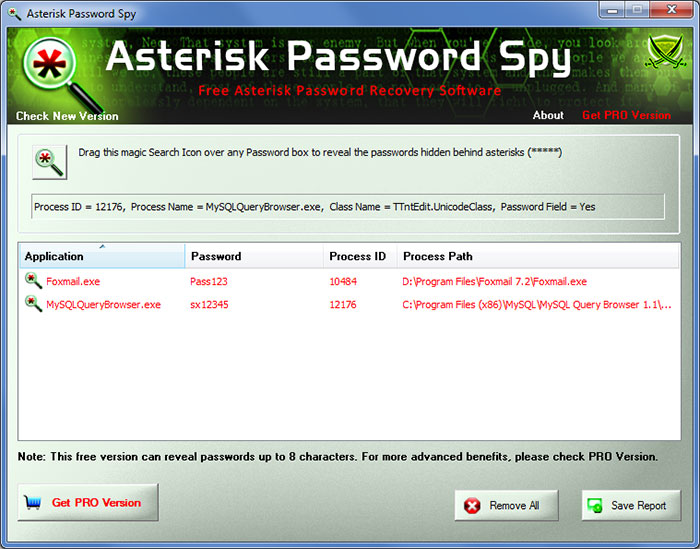
- When you place it over the password box, it will
automatically highlight it and password is added to list as shown in
the screenshot below.
- Finally you can save all recovered password list to HTML file by clicking on 'Export' button and then select the type
of file from the drop down box of 'Save File Dialog'.
|
|
|
|
| Screenshot 1:Asterisk Password Spy is showing all
the recovered passwords from password boxes of various Windows
applications. |
|
|
|
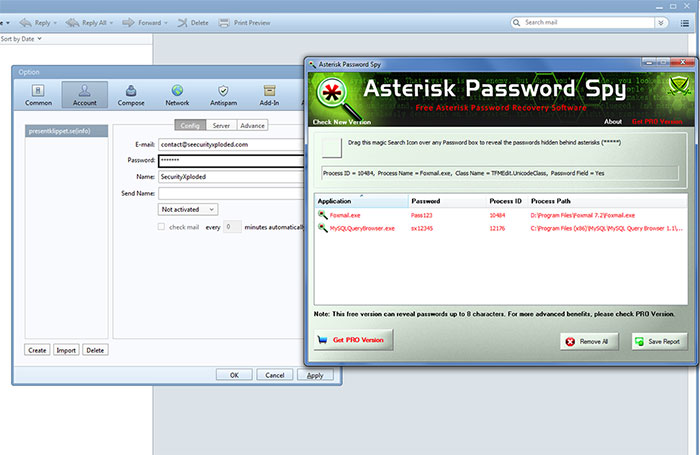
| Screenshot 2: Asterisk Password Spy revealing password from Foxmail account edit box |
|
|
| |
| |
- It does not work with non-windows based applications such
as GTK, Flash, QT or applications not using standard edit box
for the password.
- It does not work with HTML pages in the browsers such as IE,
Firefox, Chrome etc. For browsers try our Browser Password Decryptor
- Also it will not work with the application where password is not
actually present. Some times applications do not put password in the
password box to hide from these tools.
|
| |
|
| New 2023 release with improved asterisk password recovery. Also removed support for Windows XP. Now runs on Windows Vista & all higher Windows platforms.
|
| |
| Mega 2022 version supporting new Windows 11 platform. Also improved HTML password recovery report. |
| |
| New 2021 release with enhanced interface and improved 64-bit process detection |
| |
| Mega 2020 release supporting new asterisk password recovery mechanism to reveal passwords successfully |
| |
| Major 2019 edition with support for revealing asterisk passwords from more password-text fields leading to password recovery from more apps. |
| |
| Improved asterisk password viewer. Also fixed false antivirus alerts. |
| |
| Major 2018 release with the support for revealing password from windows apps. |
| |
| Updated to resolve false positive antivirus warnings. |
| |
| Major release with new installer for simple installation & un-installation. |
| |
| New 2016 edition with enhanced password revealer technique. |
| |
| Mega release with support for new Windows 10 version. Also fixed the sizing problem with higher resolution computers. |
| |
| New feature added to Installer to dynamically download latest version |
| |
| Minor updates to Installer. Also removed false positive with Antivirus solutions. |
| |
| Enhanced GUI interface with glowing icon effects. Also integrated Uninstaller into Windows Add/Remove Programs, now you can uninstall it in a standard way. |
| |
| Removed false positive with various Antivirus solutions |
| |
| New feature to generate password recovery report in CSV (Comma-Seperated Values) File Format. |
| |
| Added quick download link. Fix for screen display problem. |
| |
| Support for Windows 8. Improved User Interface with cool new banner. |
| |
| Support to export recovered password to XML file along with HTML file. Enhanced user interface with cool new banner. |
| |
| First public release of AsteriskPasswordSpy |
| |
|
| |
|
| Asterisk Password Spy is not a hacking tool as it can recover only
your stored passwords. It cannot recover the passwords for other users
unless you have right credentials. Like any tool its use either good or
bad, depends upon the user who uses it. However Author or
SecurityXploded is not
responsible for any damage caused due to misuse of this tool.
Read complete License & Disclaimer terms
here. |
| |
|
|
|
| |
|
|
|
|
|
|
| |